Wednesday, 29 October 2008

Plant Lets You Know When Its Thirsty

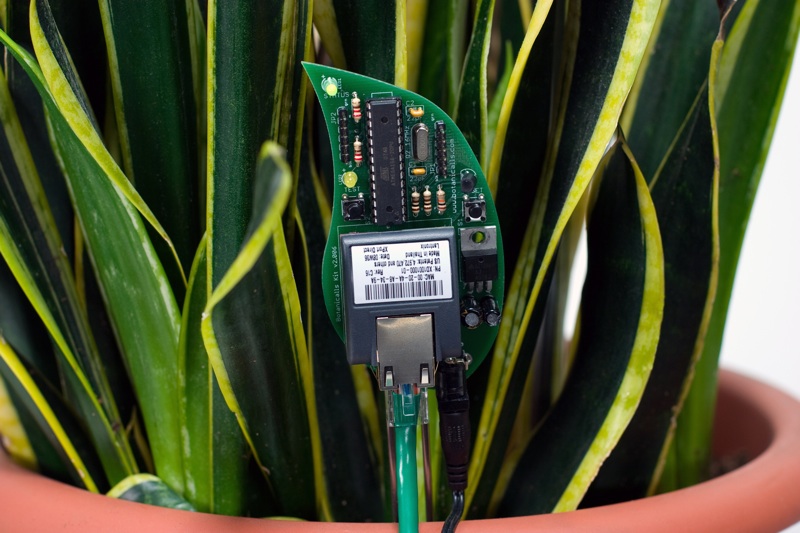
Here a moist sensor is used to measure if the plants needs to be watered or not. If this is the case the Arduino communicates with twitter and lets the user know, wherever he is, that his plant needs to be watered.

Botanicalls Kits let plants reach out for human help! They offer a connection to your leafy pal via online Twitter status updates to your mobile phone. When your plant needs water, it will post to let you know, and send its thanks when you show it love.



Reflection

Very interesting way of using the web 2.0 to get information across. I would say its a very practical solution if you are one of those persons who is always on the net but forget the choirs that need to be done around the house. A perfect way to remind yourself what needs to be done.

Source

Tuesday, 28 October 2008

DIY Gmail Notifier

I actually also researched in this particular idea last year when we had Maverick Machines. It took my interest then that we could use the Arduino to present a more physical way of grabbing someone's attention.


The following guide is deliberately fairly high-level, because the exact details will vary depending on your operating system and particular hardware setup. I did this with my Mac, but hopefully there'll be enough information here for you make it work on your system, perhaps with a little Googling.

If you don't happen to have a glowing cube lying around, you can modify this to work with almost any output device you could think of, from a simple LED, or a buzzer, to something far more clever like moving a servo (Gmail Notifier Robot, anyone?)


Again in this project a Arduino is used or rather a Boarduino. Probarly the main important thing here is the code that drives this project to turn the light to a specific colour. The hardware set-up itself is not something very complicated that we have not seen before.

I was however intrigued by using a different language to drive the Arduino the code seems pretty straightforward and gives some more insight on how to read the USB Serial port as well.

1. import serial, sys, feedparser
2.
3. #Settings - Change these to match your account details
USERNAME="username@gmail.com"
PASSWORD="yourpassword"
4. PROTO="https://"
SERVER="mail.google.com"
PATH="/gmail/feed/atom"
5.
6. SERIALPORT = "/dev/tty.usbserial-FTDK0P3M" # Change this to your serial port!
7.
8. # Set up serial port
9. try:
10. ser = serial.Serial(SERIALPORT, 9600)
11. except serial.SerialException:
12. sys.exit()
13.
14. newmails = int(feedparser.parse(PROTO + USERNAME + ":" + PASSWORD + "@" + SERVER + PATH)["feed"]["fullcount"])
15.
16. # Output data to serial port
17. if newmails > 0: ser.write('M')
18. else: ser.write('N')
19.
20. # Close serial port
21. ser.close()


The above code is Python script which is used in combination with the Universal Feed Parser module from feedparser.org

Source

Saturday, 25 October 2008

Project Idea: Wall Light Sensor

I came up with this idea when I was researching the article below, DIY Magic Mirror, the idea is basically that instead of a light switch you have a marked area on the wall with a touch sensor behind it which will act as your light switch.

The Arduino will serve as a medium to interpret touch. A short touch to the area could function as the on and off command. Touching the upper area will increase the brightness of the light and touching the lower side of the touch area will decrease the brightness of the light in the room.

Here is a little mock-up of how this could look,


Conclusion

I see this as an actual feasible fully working idea. I have almost all the necessary experience to realise this project. The only part that is unfamiliar with me is using a actual light that is connected to 220v.

Although instead of using live wires I could just use a LED which would demonstrate the same principle anyway.

Thursday, 23 October 2008

DIY Magic Mirror

I came across this project from a man who wanted to create a magic mirror as found in Disney World for his daughters. He uses a interesting mixture of sensors in this project. I am particularly interested in the touch sensors he is using behind the wall.

After multiple trips to Disneyland, I got the idea to do a Snow White type magic mirror for my two girls. I found a product after some googling but it was quite expensive so I decided to build my own. While at it, I figured I better add a Halloween Mode and Pirate mode.


The light sensors is something we have used ourselves before in one of our projects from last year so that is not something new really.


Reflection

As mentioned before I was very interested in the type of sensors used in the project especially the ones behind the wall. I could think of some interesting things to use here such as a light switch without a switch.

Source

Monday, 20 October 2008

Keyless Entry System

A student was looking for a innovative way to open his door without the need for keys. He combined a touch sensor with a high powered servo all controlled by an Arduino to open his door.

Whilst touching the sensor with his fingers in a specific manner, his code, the servo gets activated and opens the door.

Below is a little video of the system in action,


Reflection

A interesting use of technology here, not too complex and to be easily executed. It would be interesting to see this concept fully integrated in a door.

With the actual door knob being the sensor, as mentioned in the article it says that the door knob seemed a too big of a surface area to get accurate responses. Although you could have a plastic doorknob with just a small patch of where the sensor is.

Having the servo fully integrated in the door and this would be quite a innovative way of opening your door opposing technological solutions as keypads and fobs.

Source

Experimental Media

Introduction

In this particular blog i will keep track of my research and project ideas I might have for the next assignment.

In my research I will be mainly looking at innivative solutions to common problems of every day to day life or interesting future technologies.

For my own project I will be interested in creating a innovative solution myself for a common every day problem or a improved solution to existing technology.

Guido de Koning
20220908